

Economy: Difference between revisions
imported>LoekTheBawz Oooooohhhh I'm Wiking It! Quick checkpoint |
imported>LoekTheBawz Oooooohhhh I'm Wiking It! |
||
| Line 11: | Line 11: | ||
|type=AuctionHouse | |type=AuctionHouse | ||
|text=Auction House | |text=Auction House | ||
|img= | |img=3DAuctionHouseArea | ||
|content= | |content= | ||
<div class="hoverbox"> | <div class="hoverbox"> | ||
The Auction House | ==Auction House== | ||
The Auction House displays all of the items that players on your [[Rulesets|Ruleset]] are selling, either Seasonal or Default. It's located in [[The Nexus]]. | |||
===Selling=== | |||
==Selling== | To create an Auction yourself, click on the $ button in the bottom row of the GUI. After that drag the desired item into one of the slots and click on the $ button below to set a price. <br> | ||
The actual price of items will be 10% higher than you listed it for. Items stay on the Auction House for 5 days if they are not bought. | |||
{{InlineImage|file=AHSell.png|size=100px|caption=Press this icon to open the selling menu.}} | {{InlineImage|file=AHSell.png|size=100px|caption=Press this icon to open the selling menu.}} | ||
| Line 28: | Line 29: | ||
{{InlineImage|file=AHAuctioned.png|size=100px|caption=Press this icon to view sold items.}} | {{InlineImage|file=AHAuctioned.png|size=100px|caption=Press this icon to view sold items.}} | ||
==Buying== | ===Buying=== | ||
To buy an item, click on the desired item and then the green yes box, if the player has sufficient glory. To claim the item click on the Bought items button, found on the left side of the bottom row. | |||
Once purchased, the player must claim their item in the auction bought items menu. | Once purchased, the player must claim their item in the auction bought items menu. | ||
| Line 39: | Line 40: | ||
{{InlineImage|file=AHAuctioned.png|size=100px|caption=Press this icon to reclaim expired or auctioned items.}} | {{InlineImage|file=AHAuctioned.png|size=100px|caption=Press this icon to reclaim expired or auctioned items.}} | ||
== | ===Navigation=== | ||
The buttons for navigating the Auction House are found on the rightside of the bottom row. They consist of a Sorting filter and Categories. | |||
</div> | </div> | ||
}} | }} | ||
| Line 52: | Line 51: | ||
|content= | |content= | ||
<div class="hoverbox"> | <div class="hoverbox"> | ||
=Trading= | ==Trading== | ||
'''Trading''' allows players to trade items or glory in an exclusive setting. | '''Trading''' allows players to trade items or glory in an exclusive setting. <br> | ||
Players can initiate a trade through '''/trade <player>''', or by crouching and right-clicking on a player. <br> | |||
Players can initiate a trade through '''/trade <player>''', or by crouching and right-clicking on a player. | Depending on a character’s [[Rulesets | Ruleset]], a player may not be able to trade with some–''if any''–characters. <br> | ||
Depending on a character’s [[ | |||
*Hardcore Ironman Characters are unable to trade at all | *Hardcore Ironman Characters are unable to trade at all | ||
*Group Hardcore Ironman Characters can only trade within their respective group | *Group Hardcore Ironman Characters can only trade within their respective group | ||
| Line 75: | Line 72: | ||
<br> | <br> | ||
<br> | <br> | ||
''Here is an example of the | ''Here is an example of the entire process'' | ||
{{InlineImage|file=TradingDemonstration.gif|size=720px|caption=The player in the demonstration uses a shortcut, crouching and right-clicking on a player to send them a trade request.}} | {{InlineImage|file=TradingDemonstration.gif|size=720px|caption=The player in the demonstration uses a shortcut, crouching and right-clicking on a player to send them a trade request.}} | ||
| Line 89: | Line 85: | ||
<div class="hoverbox"> | <div class="hoverbox"> | ||
==Fame== | ==Fame== | ||
<b>Fame</b> is the XP that | <b>Fame</b> is the XP that the SIlverling gains when they defeat any enemy. | ||
Fame is displayed in the tab menu, and the level in the XP bar. <br> | |||
After a certain amount of fame is reached, the player’s character levels up. <br> | |||
'''Fame''' cannot be used as a currency. However, when a player’s character [[Game Mechanics#Permadeath|dies]], <br> | |||
Fame earned above level 20 is converted to Glory. If a character is below level 20, no Fame will be lost on death. | |||
'''Fame''' also determines a player’s ranking on their respective [[Rulesets|Ruleset’s]] [[Game Mechanics#Leaderboards | Leaderboard]]. | |||
The '''fame''' required to reach certain level can be calculated with the formula: <br> | |||
<math>Fame = floor(37.5(Level-1)^2)</math> | <math>Fame = floor(37.5(Level-1)^2)</math> | ||
{{Table-EconomyFame}} | {{Table-EconomyFame}} | ||
{{InlineImage|file=Tab-fame.png|size=184px|caption=The highlighted area shows the player's current fame.}} | {{InlineImage|file=Tab-fame.png|size=184px|caption=The highlighted area shows the player's current fame.}} | ||
</div> | </div> | ||
}} | }} | ||
| Line 117: | Line 109: | ||
|content= | |content= | ||
==Glory== | ==Glory== | ||
'''Glory''' is the standard currency used in [[The Nexus]]. <br> | |||
'''Glory''' is gained upon a character’s [[Game Mechanics#Permadeath|death]]. The Fame accumulated above level 20 <br> | |||
is converted into Glory. Any character below level 20 does '''not''' lose Fame, so no Glory will be gained on death. | |||
This currency can be used for various means: | |||
* Trading in the Auction House | |||
* Creating and Upgrading a [[Game Mechanics#Guilds|Guild]]. | |||
* Directly trading with other Silverlings. | |||
This currency can be | * Purchasing Companion Keys from Gorrum in [[The Nexus]]. | ||
* Converted into Soul Points at a 5:1 ratio by [[Transcendence|Moloch]] in [[The Nexus]]. | |||
* | |||
* | |||
* | |||
* | |||
* | |||
{{InlineImage|file=Tab-glory.png|size=184px|caption=The highlighted area shows the player's current fame.}} | {{InlineImage|file=Tab-glory.png|size=184px|caption=The highlighted area shows the player's current fame.}} | ||
</div> | </div> | ||
</div> | </div> | ||
}} | }} | ||
Revision as of 16:38, 2 November 2025

Economy Data
I've set up a proper economy in The Nexus to encourage the citizens to trade.
The currency used is Glory, acquired from other Silverlings or dying, which causes your built up Fame to turn into Glory.
Additionally I've set up a Seasonal Economy for Silverlings who like being put on a timer, weird guys.
Anyways it is identical to the regular one, except for the fact that it uses Seasonal Glory and only allows trading with other Seasonal characters.
Auction House
Auction House
The Auction House displays all of the items that players on your Ruleset are selling, either Seasonal or Default. It's located in The Nexus.
Selling
To create an Auction yourself, click on the $ button in the bottom row of the GUI. After that drag the desired item into one of the slots and click on the $ button below to set a price.
The actual price of items will be 10% higher than you listed it for. Items stay on the Auction House for 5 days if they are not bought.

Press this icon to open the selling menu.
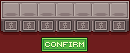
Players can list items here by placing them in the slots, and selecting a glory amount to sell for in the button directly below the slot.
If an item listed by a player has been purchased, they can claim their glory by clicking the sold item.

Press this icon to view sold items.
Buying
To buy an item, click on the desired item and then the green yes box, if the player has sufficient glory. To claim the item click on the Bought items button, found on the left side of the bottom row.
Once purchased, the player must claim their item in the auction bought items menu.

Press this icon to claim bought items.
Listed auctions have time limits. When an auction goes unpurchased for 48 hours (2 days), the auction will expire and the seller will have 168 hours (7 days) to reclaim their item before the item is deleted.
Press this icon to reclaim expired or auctioned items.
Navigation
The buttons for navigating the Auction House are found on the rightside of the bottom row. They consist of a Sorting filter and Categories.
 Trading
Trading
Trading allows players to trade items or glory in an exclusive setting.
Players can initiate a trade through /trade <player>, or by crouching and right-clicking on a player.
Depending on a character’s Ruleset, a player may not be able to trade with some–if any–characters.
- Hardcore Ironman Characters are unable to trade at all
- Group Hardcore Ironman Characters can only trade within their respective group
- Seasonal Characters can only trade with other Seasonal Characters
- Default Characters can only trade with other Default Characters
The trade menu has 4 areas of interest.
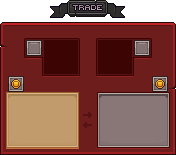
The player engaged in trading can input items here.
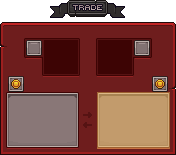
The other player being traded with will input their items here.
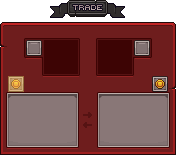
The amount entered cannot be more than what the player has.
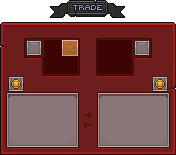
When engaged in trade, the player's head will be shown. Checking the X mark shown will confirm the player's intention to complete the trade. There is no countdown.
Here is an example of the entire process
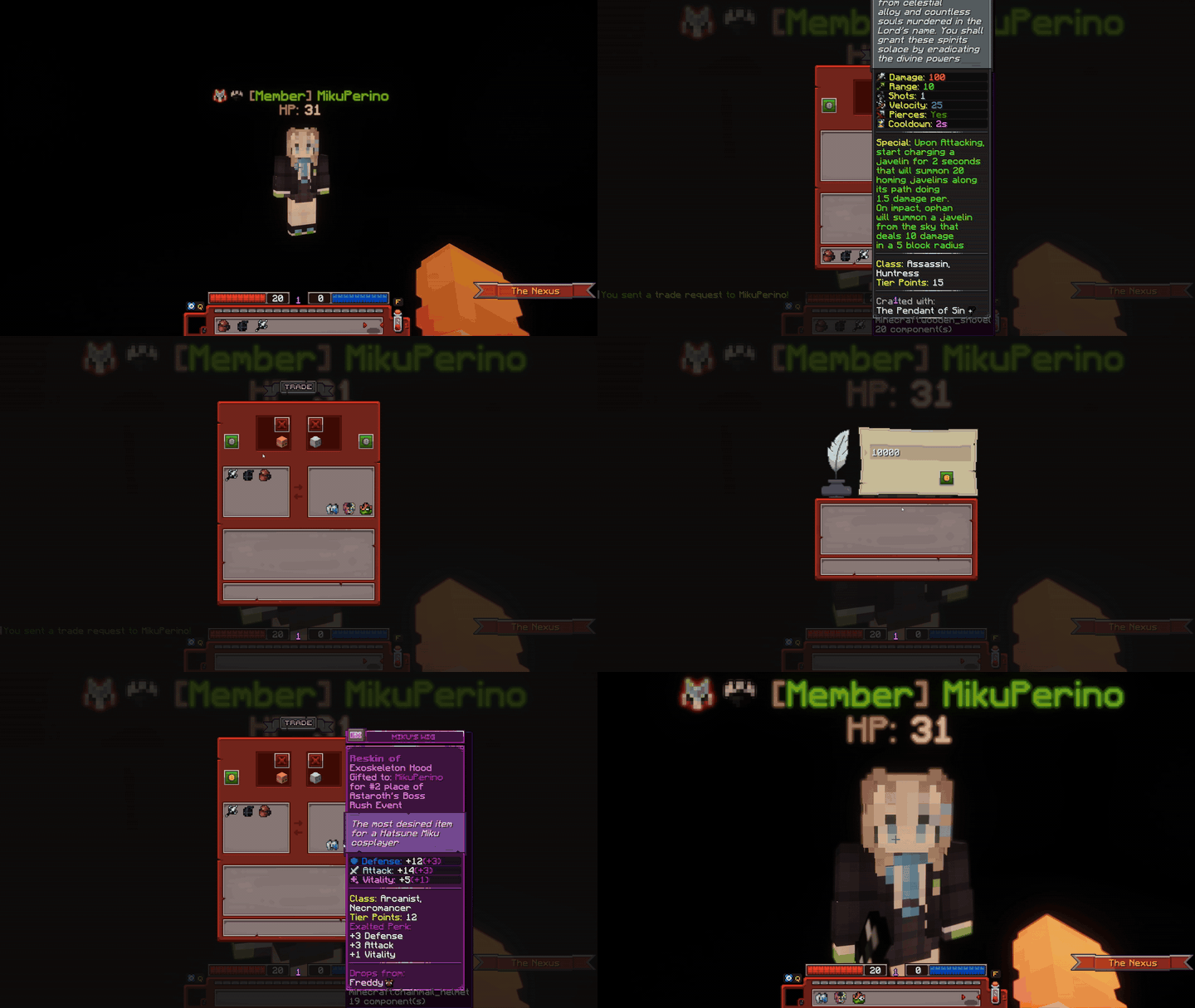
The player in the demonstration uses a shortcut, crouching and right-clicking on a player to send them a trade request.
 Fame
Fame
Fame
Fame is the XP that the SIlverling gains when they defeat any enemy.
Fame is displayed in the tab menu, and the level in the XP bar.
After a certain amount of fame is reached, the player’s character levels up.
Fame cannot be used as a currency. However, when a player’s character dies,
Fame earned above level 20 is converted to Glory. If a character is below level 20, no Fame will be lost on death.
Fame also determines a player’s ranking on their respective Ruleset’s Leaderboard.
The fame required to reach certain level can be calculated with the formula:
| Level | Fame Requirement |
|---|---|
| 1 | 0 |
| 2 | 37 |
| 3 | 150 |
| 4 | 337 |
| 5 | 600 |
| 6 | 937 |
| 7 | 1,350 |
| 8 | 1,837 |
| 9 | 2,400 |
| 10 | 3,037 |
| 11 | 3,750 |
| 12 | 4,537 |
| 13 | 5,400 |
| 14 | 6,337 |
| 15 | 7,350 |
| 16 | 8,437 |
| 17 | 9,600 |
| 18 | 10,837 |
| 19 | 12,150 |
| 20 | 13,537 |
| 30 | 31,537 |
| 40 | 57,037 |
| 50 | 90,037 |
| 60 | 130,537 |
| 70 | 178,537 |
| 80 | 234,037 |
| 90 | 297,037 |
| 100 | 367,537 |
| 150 | 832,537 |
| 200 | 1,485,037 |
| 250 | 2,325,037 |
| 300 | 3,352,537 |
| 350 | 4,567,537 |
| 400 | 5,970,037 |
| 450 | 7,560,037 |
| 500 | 9,337,537 |
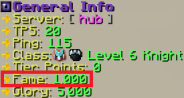
The highlighted area shows the player's current fame.
 Glory
Glory
Glory
Glory is the standard currency used in The Nexus.
Glory is gained upon a character’s death. The Fame accumulated above level 20
is converted into Glory. Any character below level 20 does not lose Fame, so no Glory will be gained on death.
This currency can be used for various means:
- Trading in the Auction House
- Creating and Upgrading a Guild.
- Directly trading with other Silverlings.
- Purchasing Companion Keys from Gorrum in The Nexus.
- Converted into Soul Points at a 5:1 ratio by Moloch in The Nexus.
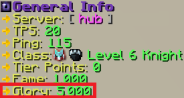
The highlighted area shows the player's current fame.