
Editor Docs: Difference between revisions
imported>Dawning No edit summary |
m Oops there was still directs to dawnings discord okay they're gone gg! |
||
| (5 intermediate revisions by 3 users not shown) | |||
| Line 1: | Line 1: | ||
You can find information about editing the wiki here. This includes useful templates, standardization policies, and more. | You can find information about editing the Telos Realms wiki here. This includes useful templates, standardization policies, and more. | ||
<div class="hoverbox"> | <div class="hoverbox"> | ||
| Line 20: | Line 20: | ||
'''Shaders and Resource Packs'''<br> | '''Shaders and Resource Packs'''<br> | ||
Photon Shaders, Profile: Ultra, Depth of Field ON | Photon Shaders, Profile: Ultra, Depth of Field ON, Motion Blur OFF (Accessibility), All Clouds OFF. ''You will not be able to see in realm if you have clouds on.''<br> | ||
'''If your device cannot achieve 30fps on these settings, feel free to go to a lower profile setting like Low, Medium, or High.'''<br> | '''If your device cannot achieve 30fps on these settings, feel free to go to a lower profile setting like Low, Medium, or High.'''<br> | ||
Only use the default Telos Realms resource pack.<br> | Only use the default Telos Realms resource pack.<br> | ||
| Line 42: | Line 42: | ||
<div class="pre-dungeon"> | <div class="pre-dungeon"> | ||
As of 10/14/2025, there is now a GUI tool created to assist with this process. If you are not part of the internal discord, please message | As of 10/14/2025, there is now a GUI tool created to assist with this process. If you are not part of the internal discord, please message loekthebawz or .willowx.x on discord for a download link. | ||
'''This was compressed with ffmpeg with the following format, which involves some relatively simple command-line compression. You can find the download for ffmpeg here: [[https://www.gyan.dev/ffmpeg/builds ffmpeg third-party]]'''<br> | '''This was compressed with ffmpeg with the following format, which involves some relatively simple command-line compression. You can find the download for ffmpeg here: [[https://www.gyan.dev/ffmpeg/builds ffmpeg third-party]]'''<br> | ||
| Line 105: | Line 105: | ||
Key-DungeonName<br> | Key-DungeonName<br> | ||
Portal-DungeonName<br> | Portal-DungeonName<br> | ||
Portal-DungeonNameFront<br> | |||
Portal-DungeonNameText<br> | |||
'''Runes'''<br> | '''Runes'''<br> | ||
| Line 145: | Line 147: | ||
* [[Template:InlineImage/doc]] {{!}} A way to format images easily and nicely in between left-aligned text. | * [[Template:InlineImage/doc]] {{!}} A way to format images easily and nicely in between left-aligned text. | ||
* [[Template:ClassList/doc]] {{!}} How the class pages display their ordered and colored lists of items in Weapons, Abilities, and Armours. | * [[Template:ClassList/doc]] {{!}} How the class pages display their ordered and colored lists of items in Weapons, Abilities, and Armours. | ||
* [[Template:DynamicGifDisplay/doc]] {{!}} Used for the skill tree page, but can be adapted to other uses. This works off of tooltip hovers, and displays an appropiate gif for the item being hovered. Submit requests to change or add features to this to | * [[Template:DynamicGifDisplay/doc]] {{!}} Used for the skill tree page, but can be adapted to other uses. This works off of tooltip hovers, and displays an appropiate gif for the item being hovered. Submit requests to change or add features to this to .willowx.x on discord. | ||
* [[Template:DLog/doc]] {{!}} Creates a background and border outline effect to house the D Log text. D Logs are lore-related logs that exist solely on this wiki, acting as a way to immersify the player. Use this instead of the class. Replace class instances with this. | * [[Template:DLog/doc]] {{!}} Creates a background and border outline effect to house the D Log text. D Logs are lore-related logs that exist solely on this wiki, acting as a way to immersify the player. Use this instead of the class. Replace class instances with this. | ||
</div> | </div> | ||
| Line 162: | Line 164: | ||
=A Note on Legacy Content= | =A Note on Legacy Content= | ||
Keeping up with the game's texture changes, boss changes, and more is hard. If you find something that is outdated or wrong, but do not wish to fix it yourself or are unable to, '''PLEASE''' bring up these issues to | Keeping up with the game's texture changes, boss changes, and more is hard. If you find something that is outdated or wrong, but do not wish to fix it yourself or are unable to, '''PLEASE''' bring up these issues to loekthebawz or .willowx.x on Discord.<br> | ||
</div> | </div> | ||
Latest revision as of 13:49, 28 December 2025
You can find information about editing the Telos Realms wiki here. This includes useful templates, standardization policies, and more.
In-Game Media Standardization
All images, gifs, and videos must follow this format for the online Telos Realms wiki.
Video Settings
FOV: Normal
GUI Scale: 4x
GUI
Your inventory must be clear of everything except for anything you might be demonstrating with.
Scenic images/gifs must be taking in the F1 perspective (No HUD).
If your hotbar or held item is part of the demonstration, then only items needed to demonstrate can be in the hotbar.
Do not have RealmsAddon, Torilhos Addon, or other addon mod GUIs cluttering your screen
The only situation where these should be cluttering your screen is in the case of demonstrating how they work on an explicitly detailed page, concerning their status as unofficial third party mods.
Generally, don't have anything else than what you need to have on screen. Potion level and the like is okay to ignore.
Shaders and Resource Packs
Photon Shaders, Profile: Ultra, Depth of Field ON, Motion Blur OFF (Accessibility), All Clouds OFF. You will not be able to see in realm if you have clouds on.
If your device cannot achieve 30fps on these settings, feel free to go to a lower profile setting like Low, Medium, or High.
Only use the default Telos Realms resource pack.
Game Clients
The only allowed third-party client to be shown is the Feather Client. Logos from other clients are strongly discouraged, unless you are demonstrating something like "How to disable bossbars in RuinEverythingClient 9.0."
Optional Mods
Bobby is a great mod for extending render distance on servers. This lets you take better scenic pictures.
Distant Horizons is similar, but is much less suited for servers and can be finnicky.
Video Compression
Do not upload excessively large videos.
Do not upload painfully compressed videos.
You can use tools like ffmpeg or online compressing tools. It is your responsibility to ensure these compressed versions are not harmful to the eyes.
Here is a good example of a .gif that follows the above rules.
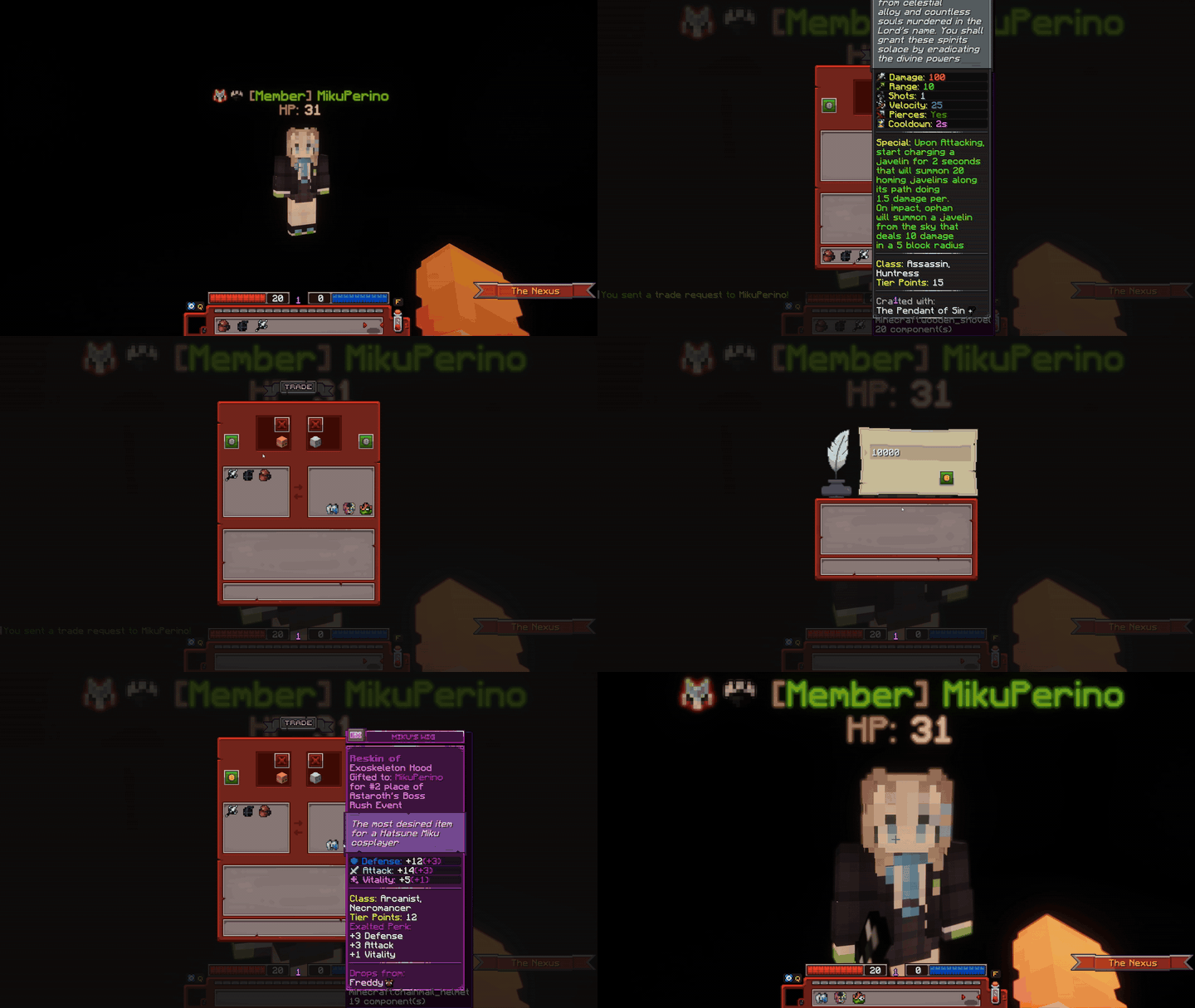
Note that the Minecraft lore of the items in clip are not fully visible.
This is okay if you are not explicitly demonstrating the items.
If you are demonstrating items, please lower GUI scale to 3x to fit the lore.
As of 10/14/2025, there is now a GUI tool created to assist with this process. If you are not part of the internal discord, please message loekthebawz or .willowx.x on discord for a download link.
This was compressed with ffmpeg with the following format, which involves some relatively simple command-line compression. You can find the download for ffmpeg here: [ffmpeg third-party]
You do not have to use ffmpeg, but knowing how to use these commands will vastly help you in your compressing efforts. It is also really really easy even if you have never used something like this before.
.\ffmpeg -i "C:\Users\dawning\Videos\Minecraft\tradingwiki.mp4" -vf "fps=60,scale=720:-1:flags=lanczos,palettegen" palette.png Creates a palette to prevent grainy compression.
.\ffmpeg -i "C:\Users\dawning\Videos\Minecraft\tradingwiki.mp4" -i palette.png -filter_complex "fps=30,scale=720:-1:flags=lanczos[x];[x][1:v]paletteuse=dither=bayer:bayer_scale=5" -loop 0 tradingwiki.gif Creates the gif in the directory the user is cd'd in.
Breakdown of the above input (if you care for it and want to manipulate some flags, otherwise using the general format should be okay.):
.\ffmpeg → Runs the FFmpeg executable in the current directory.
-i "C:\Users\dawning\Videos\Minecraft\tradingwiki.mp4" → Input video file.
-vf "..." → Video filter chain:
fps=60 → Converts video to 60 frames per second (higher FPS gives smoother motion).
scale=720:-1 → Resizes width to 720 pixels; height auto-calculated to maintain aspect ratio (-1).
flags=lanczos → Uses Lanczos resampling for higher-quality scaling.
palettegen → Generates a color palette optimized for GIFs.
palette.png → Output image file containing the generated palette.
-i "C:\Users\dawning\Videos\Minecraft\tradingwiki.mp4" → Input video again.
-i palette.png → Palette generated in step 1.
-filter_complex "..." → Complex filter combining scaling, FPS, and palette:
fps=30 → Sets final GIF frame rate to 30 FPS (slightly lower for smaller file size, higher frame rates can result in slow-motion gifs).
scale=720:-1:flags=lanczos → Resizes video to 720px wide (height auto).
[x] → Stores the scaled video in a temporary label x.
[x][1:v]paletteuse=dither=bayer:bayer_scale=5 → Applies the palette to the video using Bayer dithering, which smooths color transitions.
-loop 0 → Makes the GIF loop infinitely.
tradingwiki.gif → Output GIF file.
File Naming Scheme
Items
Ut-ItemName
Ex-ItemName
Item-ItemName (if not specific)
TXXType(H, C, L, B)
Tiered Items
T#TypeSlot
Example: T9LightH for a Tier 9 Light Helmet
Item Reskins
HReskin-OriginalItemName
CReskin-OriginalItemName
VReskin-OriginalItemName
CustomReskin-OriginalItemName
Models and Renders
3DItemName
3DMobName (applicable to all bosses)
2DBossName (if they have an icon, like the realm bosses)
3DPet/MountName
2DPet/MountName
Skin-3DPet/MountName
Skin-2DPet/MountName
Dungeons
Key-DungeonName
Portal-DungeonName
Portal-DungeonNameFront
Portal-DungeonNameText
Runes
Rune-Name
Bossbars
NameBossBar
Biome, Dungeon, and General Images and Icons
Biome-BiomeName#
Dungeon-DungeonName#
Image-WhatItsFor#
Icon-WhatItIs
Legacy
LegacyUt-Name
LegacyEx-Name
LegacyPet-Name
LegacyMount-Name
LegacyKey-Name
LegacyPortal-Name
Miscellaneous
No spaces inbetween anything.
Correct capitalization. For example: 3DTombOfShadows.
Add punctuation that exists in the real item; if an item has an apostrophe then add it to the name.
Tiered: H,C,L,B represents the first letters for the words Helmet, Chestplate, Leggings, Boots.
Reskins: HCV represents Halloween, Christmas, and Valentine's - Custom signifies it was reskinned for other purposes.
List of Useful Templates
Some templates are custom made for this wiki. You can find a directory of template documents here.
Feel free to add links to expand this list.
- Template:NPCInfobox/doc | The infobox used to represent NPCs.
- Template:ItemInfobox/doc | The infobox used to represent items.
- Template:InlineImage/doc | A way to format images easily and nicely in between left-aligned text.
- Template:ClassList/doc | How the class pages display their ordered and colored lists of items in Weapons, Abilities, and Armours.
- Template:DynamicGifDisplay/doc | Used for the skill tree page, but can be adapted to other uses. This works off of tooltip hovers, and displays an appropiate gif for the item being hovered. Submit requests to change or add features to this to .willowx.x on discord.
- Template:DLog/doc | Creates a background and border outline effect to house the D Log text. D Logs are lore-related logs that exist solely on this wiki, acting as a way to immersify the player. Use this instead of the class. Replace class instances with this.
List of Useful Classes
A large amount of CSS is applied through classes (and you should not be using style="" often!!!!).
You can find a list of these classes and what they do here. Feel free to expand this list.
- hoverbox | Adds a hover effect to emphasize what the user is looking at. This section is currently using one.
- pre-dungeon | Adds a shadow effect to emphasize the text. The "In-Game Media Standardization" section on this page uses this.
A Note on Legacy Content
Keeping up with the game's texture changes, boss changes, and more is hard. If you find something that is outdated or wrong, but do not wish to fix it yourself or are unable to, PLEASE bring up these issues to loekthebawz or .willowx.x on Discord.