



imported>Dawning mNo edit summary |
the mass documenting |
||
| (36 intermediate revisions by 3 users not shown) | |||
| Line 1: | Line 1: | ||
{{BossInfobox | '''<code><nowiki>{{NPCInfobox}}</nowiki></code> is the card used for every boss and dungeon enemy.''' It runs on [[Module:Infobox]] and shows the NPC's render, an optional boss-bar banner, stats, class restrictions, attack pattern, full loot table and tier-point requirements. <code><nowiki>{{BossInfobox}}</nowiki></code> is a redirect to this template, so they are the same thing. | ||
__TOC__ | |||
== Overview == | |||
Place one NPCInfobox at the top of a dungeon, biome or world-boss page. Fill in only the fields you need — empty ones are hidden. The card is organised into sections: '''Special''', '''General Info''', '''Class Restrictions''', '''Attack Pattern''', '''Loot''' and '''Tier Points'''. Loot is grouped by essence/rarity, each group taking a comma-separated list of items. | |||
== | == Parameters == | ||
< | {| class="wikitable" | ||
! Parameter !! Required? !! What it does !! Example | |||
| | |- | ||
| | | <code>title</code> || Required || NPC name. Add a subtitle after a semicolon (rendered smaller). || <code>Kurvaros;Machinist Maestro</code> | ||
| | |- | ||
| <code>image</code> || Required || <code>render</code> or <code>render;bossbar</code>. The render shows at 300px; the bossbar (no <code>.png</code> — it is added for you) shows as a wide banner. Defaults to Site-logo if blank. || <code>Boss-3DKurvaros.png;Bossbar-Kurvaros</code> | |||
|- | |||
| <code>SpecialInfo</code> || Optional || Free text in the "Special" section (no label). || <code>Enraged below 33% HP</code> | |||
|- | |||
| <code>Desc</code> || Optional || Description / flavour (no label). || <code>A machine that grows by absorbing invaders.</code> | |||
|- | |||
| <code>Health</code> || Optional || Boss/enemy HP (labelled "HP"). || <code>3520</code> | |||
|- | |||
| <code>Fame</code> / <code>Glory</code> || Optional || Fame / Glory given on kill. || <code>450</code> | |||
|- | |||
| <code>Biome</code> || Optional || Biome (auto-linked). || <code>Desert</code> | |||
|- | |||
| <code>Tiered</code> || Optional || "Available Tiered Drops" — usually the bag icons / tier range. || <code>7-8</code> | |||
|- | |||
| <code>DungeonDrop</code> || Optional || "Dungeon Dropped". One or more <code>Page;Icon.png</code> pairs, comma-separated. || <code>Anubis Lair;Portal-AnubisLair.png</code> | |||
|- | |||
| <code>CWeapon</code> / <code>CArmour</code> / <code>CAbilities</code> || Optional || Class-restriction rows (Weapon / Armour / Abilities). || <code>Knight only</code> | |||
|- | |||
| <code>Attack</code> || Optional || Attack-pattern text (no label). || <code>Fires a single explosive projectile.</code> | |||
|- | |||
| <code>Unholy</code> <code>Voidbound</code> <code>Bloodshot</code> <code>Royal</code> <code>Gilded</code> <code>Irradiated</code> <code>Halloween</code> <code>Christmas</code> <code>Valentine</code> <code>Companion</code> <code>Rune</code> || Optional || Loot groups. Each is a comma-separated list of items in the form <code>Page;Name;File.png;Percent</code>. || see below | |||
|- | |||
| <code>Frag</code> || Optional || Fragment drops as <code>Rarity;Percent</code> (comma-separated for several). || <code>Royal;75</code> | |||
|- | |||
| <code>Required</code> || Optional || Required Tier Points to enter. || <code>45</code> | |||
|- | |||
| <code>Solo</code> || Optional || Recommended solo Tier Points. || <code>60</code> | |||
|} | |||
== How to use == | |||
The repeating syntax to learn is the '''loot item''': | |||
DirectedPage;ItemName;File.png;Percent | |||
* '''DirectedPage''' — the page the link points to (e.g. <code>Weapons</code>). | |||
< | * '''ItemName''' — the visible link text. | ||
* '''File.png''' — the item image (just the filename — '''no''' <code>[[File:…]]</code> brackets). | |||
* '''Percent''' — drop chance, the '''number only''' (no <code>%</code>). | |||
Add more items in the same group by separating with a '''comma''': | |||
Weapons;Mechanical Cutlass;Ut-MechanicalCutlass.png;2,Armours;Black Hole Sandals;Ut-BlackHoleSandals.png;2 | |||
Other field formats: '''title''' = <code>Name;Subtitle</code> (subtitle optional); '''image''' = <code>render;bossbar</code> (bossbar optional, no <code>.png</code>); '''DungeonDrop''' = <code>Page;Icon.png</code>; '''Frag''' = <code>Rarity;Percent</code>. | |||
== Copy this == | |||
<syntaxhighlight lang="wikitext" style="overflow:auto;"> | |||
{{NPCInfobox | |||
|title = | |||
|image = .png | |||
|SpecialInfo = | |||
|Health = | |||
|Fame = | |||
|Glory = | |||
|Biome = | |||
|Tiered = | |||
|DungeonDrop = | |||
|Attack = | |||
|Unholy = | |||
|Voidbound = | |||
|Bloodshot = | |||
|Royal = | |||
|Gilded = | |||
|Irradiated = | |||
|Halloween = | |||
|Christmas = | |||
|Valentine = | |||
|Companion = | |||
|Rune = | |||
|Frag = | |||
|Required = | |||
|Solo = | |||
}} | |||
</syntaxhighlight> | |||
== Example == | |||
{{NPCInfobox | |||
|title = Kurvaros;Machinist Maestro | |||
|Royal= | |image = Boss-3DKurvaros.png;Bossbar-Kurvaros | ||
| | |Health = 3520 | ||
| | |Fame = 450 | ||
|Glory = 450 | |||
| | |Biome = Desert | ||
| | |Tiered = 7-8 | ||
|Royal = Weapons;Mechanical Cutlass;Ut-MechanicalCutlass.png;2, | |||
Abilities;Voltaic Bomb;Ut-VoltaicBomb.png;2 | |||
|Frag = Royal;75 | |||
|Required = 45 | |||
|Solo = 60 | |||
}} | |||
<syntaxhighlight lang="wikitext" style="overflow:auto;"> | |||
{{NPCInfobox | |||
|title = Kurvaros;Machinist Maestro | |||
|image = Boss-3DKurvaros.png;Bossbar-Kurvaros | |||
|Health = 3520 | |||
|Fame = 450 | |||
|Glory = 450 | |||
|Biome = Desert | |||
|Tiered = 7-8 | |||
|Royal = Weapons;Mechanical Cutlass;Ut-MechanicalCutlass.png;2, | |||
Abilities;Voltaic Bomb;Ut-VoltaicBomb.png;2 | |||
|Frag = Royal;75 | |||
|Required = 45 | |||
|Solo = 60 | |||
}} | |||
</syntaxhighlight> | |||
A plain '''dungeon enemy''' just needs a render, HP and attack: | |||
<syntaxhighlight lang="wikitext" style="overflow:auto;"> | |||
{{NPCInfobox | |||
|title = Beetle Trooper | |||
|image = Mob-3DBeetleTrooper.png | |||
|Health = 127 | |||
|Fame = 35 | |||
|Glory = 35 | |||
|Attack = Fires a single explosive projectile at the player. | |||
|Frag = Royal;5 | |||
}} | }} | ||
</syntaxhighlight> | </syntaxhighlight> | ||
== | == Tips & notes == | ||
< | * The '''bossbar''' in <code>image</code> is written '''without''' <code>.png</code> (the template adds it). Render names follow the file scheme: <code>Boss-3DName.png</code> bosses, <code>Mob-3DName.png</code> enemies, with <code>Bossbar-Name</code> for the bar. | ||
* In loot lists, put the filename only — never <code>[[File:…]]</code> — and the percent as a bare number. | |||
* Used by dungeon pages, biome pages and the [[World Bosses]] page. {{tl|BossInfobox}} redirects here. | |||
* Related: {{tl|ItemInfobox}} (items), {{tl|Dungeon Link}} (portal thumbnails), [[Module:Infobox]] (engine). | |||
| | |||
| | |||
| | |||
<br clear="both"> | <br clear="both"> | ||
Latest revision as of 11:55, 20 June 2026
{{NPCInfobox}} is the card used for every boss and dungeon enemy. It runs on Module:Infobox and shows the NPC's render, an optional boss-bar banner, stats, class restrictions, attack pattern, full loot table and tier-point requirements. {{BossInfobox}} is a redirect to this template, so they are the same thing.
Overview
Place one NPCInfobox at the top of a dungeon, biome or world-boss page. Fill in only the fields you need — empty ones are hidden. The card is organised into sections: Special, General Info, Class Restrictions, Attack Pattern, Loot and Tier Points. Loot is grouped by essence/rarity, each group taking a comma-separated list of items.
Parameters
| Parameter | Required? | What it does | Example |
|---|---|---|---|
title |
Required | NPC name. Add a subtitle after a semicolon (rendered smaller). | Kurvaros;Machinist Maestro
|
image |
Required | render or render;bossbar. The render shows at 300px; the bossbar (no .png — it is added for you) shows as a wide banner. Defaults to Site-logo if blank. |
Boss-3DKurvaros.png;Bossbar-Kurvaros
|
SpecialInfo |
Optional | Free text in the "Special" section (no label). | Enraged below 33% HP
|
Desc |
Optional | Description / flavour (no label). | A machine that grows by absorbing invaders.
|
Health |
Optional | Boss/enemy HP (labelled "HP"). | 3520
|
Fame / Glory |
Optional | Fame / Glory given on kill. | 450
|
Biome |
Optional | Biome (auto-linked). | Desert
|
Tiered |
Optional | "Available Tiered Drops" — usually the bag icons / tier range. | 7-8
|
DungeonDrop |
Optional | "Dungeon Dropped". One or more Page;Icon.png pairs, comma-separated. |
Anubis Lair;Portal-AnubisLair.png
|
CWeapon / CArmour / CAbilities |
Optional | Class-restriction rows (Weapon / Armour / Abilities). | Knight only
|
Attack |
Optional | Attack-pattern text (no label). | Fires a single explosive projectile.
|
Unholy Voidbound Bloodshot Royal Gilded Irradiated Halloween Christmas Valentine Companion Rune |
Optional | Loot groups. Each is a comma-separated list of items in the form Page;Name;File.png;Percent. |
see below |
Frag |
Optional | Fragment drops as Rarity;Percent (comma-separated for several). |
Royal;75
|
Required |
Optional | Required Tier Points to enter. | 45
|
Solo |
Optional | Recommended solo Tier Points. | 60
|
How to use
The repeating syntax to learn is the loot item:
DirectedPage;ItemName;File.png;Percent
- DirectedPage — the page the link points to (e.g.
Weapons). - ItemName — the visible link text.
- File.png — the item image (just the filename — no
File:…brackets). - Percent — drop chance, the number only (no
%).
Add more items in the same group by separating with a comma:
Weapons;Mechanical Cutlass;Ut-MechanicalCutlass.png;2,Armours;Black Hole Sandals;Ut-BlackHoleSandals.png;2
Other field formats: title = Name;Subtitle (subtitle optional); image = render;bossbar (bossbar optional, no .png); DungeonDrop = Page;Icon.png; Frag = Rarity;Percent.
Copy this
{{NPCInfobox
|title =
|image = .png
|SpecialInfo =
|Health =
|Fame =
|Glory =
|Biome =
|Tiered =
|DungeonDrop =
|Attack =

|Unholy =
|Voidbound =
|Bloodshot =
|Royal =
|Gilded =
|Irradiated =
|Halloween =
|Christmas =
|Valentine =
|Companion =
|Rune =
|Frag =

|Required =
|Solo =
}}
Example
Kurvaros
Machinist Maestro
Machinist Maestro
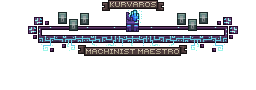
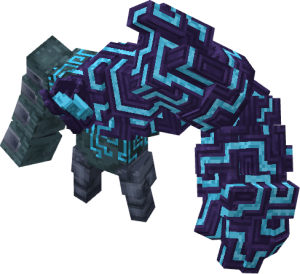
General Info
HP
3520
Fame Given
450
Glory Given
450
Biome
Desert
Available Tiered Drops
7-8
Tier Points
Required Tier Points
45
Recommended Solo Tier Points
60
{{NPCInfobox
|title = Kurvaros;Machinist Maestro
|image = Boss-3DKurvaros.png;Bossbar-Kurvaros
|Health = 3520
|Fame = 450
|Glory = 450
|Biome = Desert
|Tiered = 7-8
|Royal = Weapons;Mechanical Cutlass;Ut-MechanicalCutlass.png;2,
Abilities;Voltaic Bomb;Ut-VoltaicBomb.png;2
|Frag = Royal;75
|Required = 45
|Solo = 60
}}
A plain dungeon enemy just needs a render, HP and attack:
{{NPCInfobox
|title = Beetle Trooper
|image = Mob-3DBeetleTrooper.png
|Health = 127
|Fame = 35
|Glory = 35
|Attack = Fires a single explosive projectile at the player.
|Frag = Royal;5
}}
Tips & notes
- The bossbar in
imageis written without.png(the template adds it). Render names follow the file scheme:Boss-3DName.pngbosses,Mob-3DName.pngenemies, withBossbar-Namefor the bar. - In loot lists, put the filename only — never
File:…— and the percent as a bare number. - Used by dungeon pages, biome pages and the World Bosses page.
{{BossInfobox}}redirects here. - Related:
{{ItemInfobox}}(items),{{Dungeon Link}}(portal thumbnails), Module:Infobox (engine).